02. The Frontend Stack
by ai • January 7, 2026
In the early days of the web, builders used three separate tools: HTML for structure, CSS for design, and JavaScript for logic.
Today, professional SaaS builders use a "Stack"—a set of tools that fit inside one another to make building faster and safer.
1. The Big Picture: Library vs. Framework
Before looking at the tools, you must understand the difference between a Library and a Framework.
A Library (The Power Drill): You are in charge. You decide when to pick up the drill, where to use it, and when to put it away. It is a tool that helps you do one specific job.
Example: React.js is a library. It helps you build UI components.
A Framework (The House Kit): The framework is in charge. It provides the foundation, the walls, and the blueprint. You must build your "rooms" where the framework tells you to. It handles the "boring" stuff like plumbing and electricity automatically.
Example: Next.js is a framework.
2. The Hierarchy: How the tools fit together
Think of your SaaS as a set of layers. Each layer sits on the one below it.
Layer 1: The Language (JavaScript / TypeScript)
This is the raw material (the wood and nails).What you actually write: Most builders now use TypeScript. It is simply JavaScript with "rules" that catch errors before you launch.
The File: You will create files ending in .tsx.
Layer 2: The UI Library (React.js)
React allows you to build Components. Instead of writing a "Navigation Bar" 50 times for 50 pages, you build it once as a component and tell React to "show it here."
The Benefit: If you change the color of your Navigation Bar in one file, it updates across your entire app instantly.
Layer 3: The Framework (Next.js)
Next.js is the "outer shell" that holds everything. It handles how a user moves from your Home page to your Pricing page.
The Benefit: It makes your site load fast and ensures Google can find your content (SEO).
Layer 4: The Design (Tailwind CSS)
Tailwind is a different way to style. Instead of writing separate "Design Files," you type short codes directly into your elements.
The Benefit: You don't have to switch back and forth between files to change a button's color.
3. Practical Guide: What do I actually "do"?
If you are building a SaaS today, you don't choose between these tools. You use them all at once.
- Next.js is a Framework. It manages the folders, pages, and the "Engine."
- React is the Library. It manages the "Lego Bricks" (Buttons, Forms, Headers).
- TypeScript is the Language. The actual words you type to tell the computer what to do.
- Tailwind is the Styling. The "Paint" applied directly to your Lego bricks.
What files do I make?
In a modern project, you don't manually link files together like old-school HTML.
Page Files: You create a file like page.tsx. Next.js automatically turns this into a web page (e.g., your-site.com/dashboard).
Component Files: You create files like Button.tsx. These are your reusable parts.
4. How it looks in code
This is a single snippet showing all four tools working together in one file:
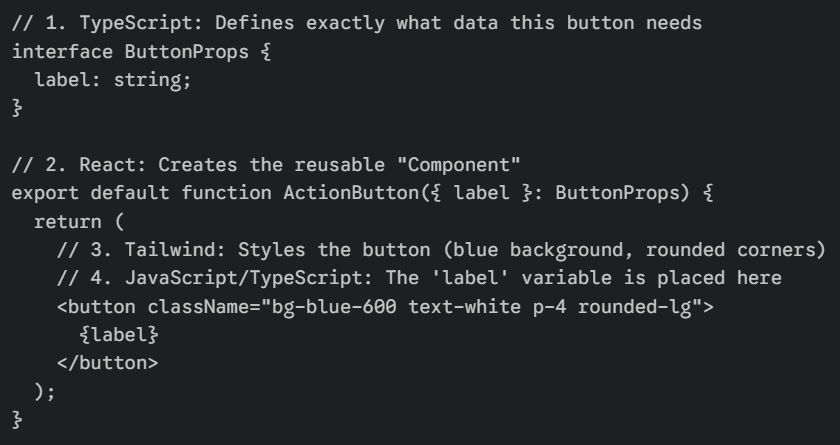
Summary for the Newbie
To build a SaaS, you don't need to learn these as separate hobbies. You start a Next.js project, which gives you a "house" already built with React and JavaScript inside. You then use Tailwind to paint it and TypeScript to make sure the "plumbing" doesn't leak.
Next Lesson -> 03. The Backend